How to see a name in cursive
- Type the name. It appears at the top in large cursive letters as you type. Start it with a capital letter, as you would write it.
- Look at the letters. Under the name, each letter it uses has a button that opens that letter's page, with the capital and the lowercase form stroke by stroke. A short note says whether the capital joins the next letter.
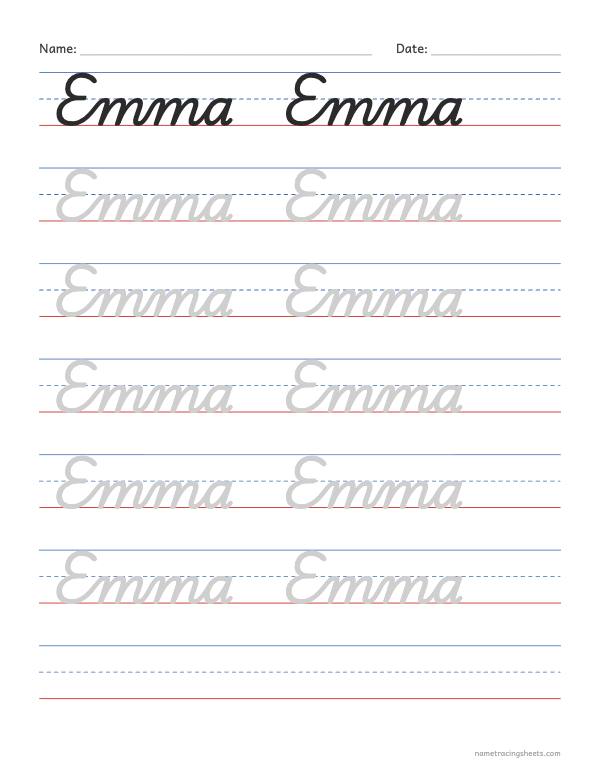
- Print it to trace. The sheet shows the name in solid ink on the first line and in light gray on the lines below. Pick a line size, then print or save a PDF. Download PNG saves the page as a picture.
- More than one name? Put one name per line. The large preview shows the first; each name gets its own printed page.
Capitals that join, and capitals that stand alone
The first letter of a name is a capital, and in this cursive not every capital joins the letter after it. These capitals join straight into the next letter: A, C, E, I, J, K, L, M, N, Q, R, U, X, Y, Z.
These end on their own, so the pencil lifts and the next letter starts fresh with its lead-in stroke: B, D, F, G, H, O, P, S, T, V, W. A name such as Theo or Sofia has a small gap after the capital. That is how the letters are meant to look, not a mistake to fix.
Every letter of a name, one at a time
If one letter in the name keeps going wrong, practice it alone first. Each letter has its own page with the capital and the lowercase letter stroke by stroke, how it joins, and words to trace:
Which cursive this is
The letters are traditional US cursive, the joined handwriting taught in American schools, drawn with Playwrite US Traditional, an open-source typeface made for teaching it. Lowercase letters sit on the baseline and reach the dashed midline, tall letters such as l, h and k reach the top line, and g, j, p, q, y and z loop below the baseline.
It is meant for learning to write a name by hand, not for decoration. Signature generators and copy-and-paste cursive text tools produce something different: fancy script fonts, or special characters that only look like cursive and that screen readers read out letter by letter. The cursive here is the plain school kind a teacher would accept on a worksheet.
Tips for writing a name in cursive
- Write the capital first, then the rest in one go. After the capital, keep the pencil on the paper until the end of the name. Dot the i, cross the t and add accents last.
- Watch the letters that end high. b, o, v and w finish at the midline, so the letter after them joins from up there. Names like Olivia, Bowen and Owen have these joins.
- Long names need room. If a name looks small on the sheet, tick Landscape page under More options, or put a long last name on its own line.
- Trace before copying. Trace the gray name a few times, then write it on an empty line without help. Add empty lines under More options.
- A few minutes a day. The same sheet on several days works better than many different ones at once.
Other cursive worksheets
For a page with only the name, ready to trace and without the large preview, use cursive name tracing worksheets. To learn the whole alphabet first, print the cursive alphabet worksheets, one letter pair per page. For words and short sentences, use the cursive writing worksheets. Still learning print? The name tracing worksheet generator makes dotted print letters with starting dots and arrows.